
Migrating a Domain to deSEC.io
deSEC.io is a completely free, privacy-focused DNS hosting service that provides enterprise-grade features including DNSSEC, ACME integration for Let’s Encrypt certificates, and a comprehensive REST API.
This article introduces how to migrate a domain to deSEC.io.
Why Choose deSEC?
- 💰 100% Free - No hidden costs or usage limits
- 🔐 Built-in Security - Automatic DNSSEC signing
- 📜 Certificate Automation - Native Let’s Encrypt integration
- 🌍 Privacy First - GDPR compliant, no data collection
- ⚡ Developer Friendly - Full API access and CLI tools
Key Benefits You’ll Get:
- Automatic TLS Certificates - Wildcard certificates via Let’s Encrypt
- Easy Management - Web interface or API for all operations
- High Reliability - Anycast network with 99.9% uptime
- Zero Maintenance - No manual DNSSEC or certificate renewal needed
Migration Steps
-
Create Account → Sign up at desec.io
-
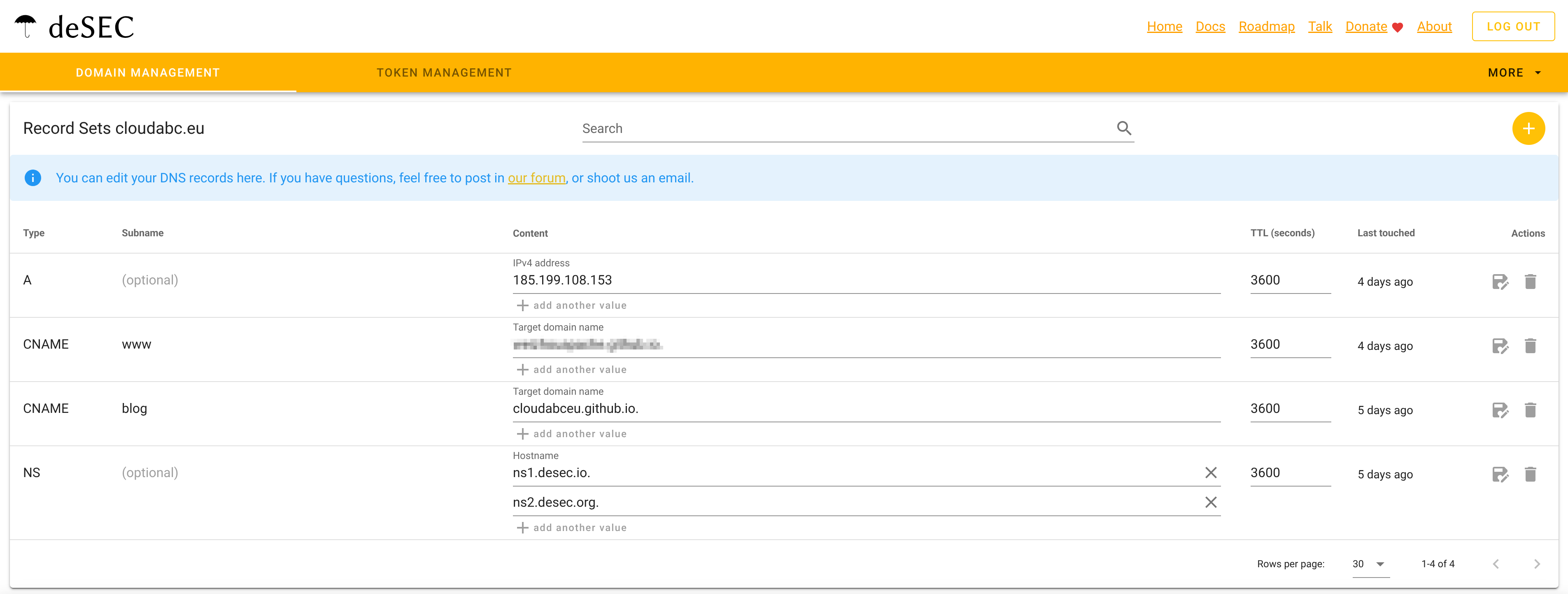
Import DNS Records → Transfer your existing DNS configuration
You can export the DNS records from your DNS providers,
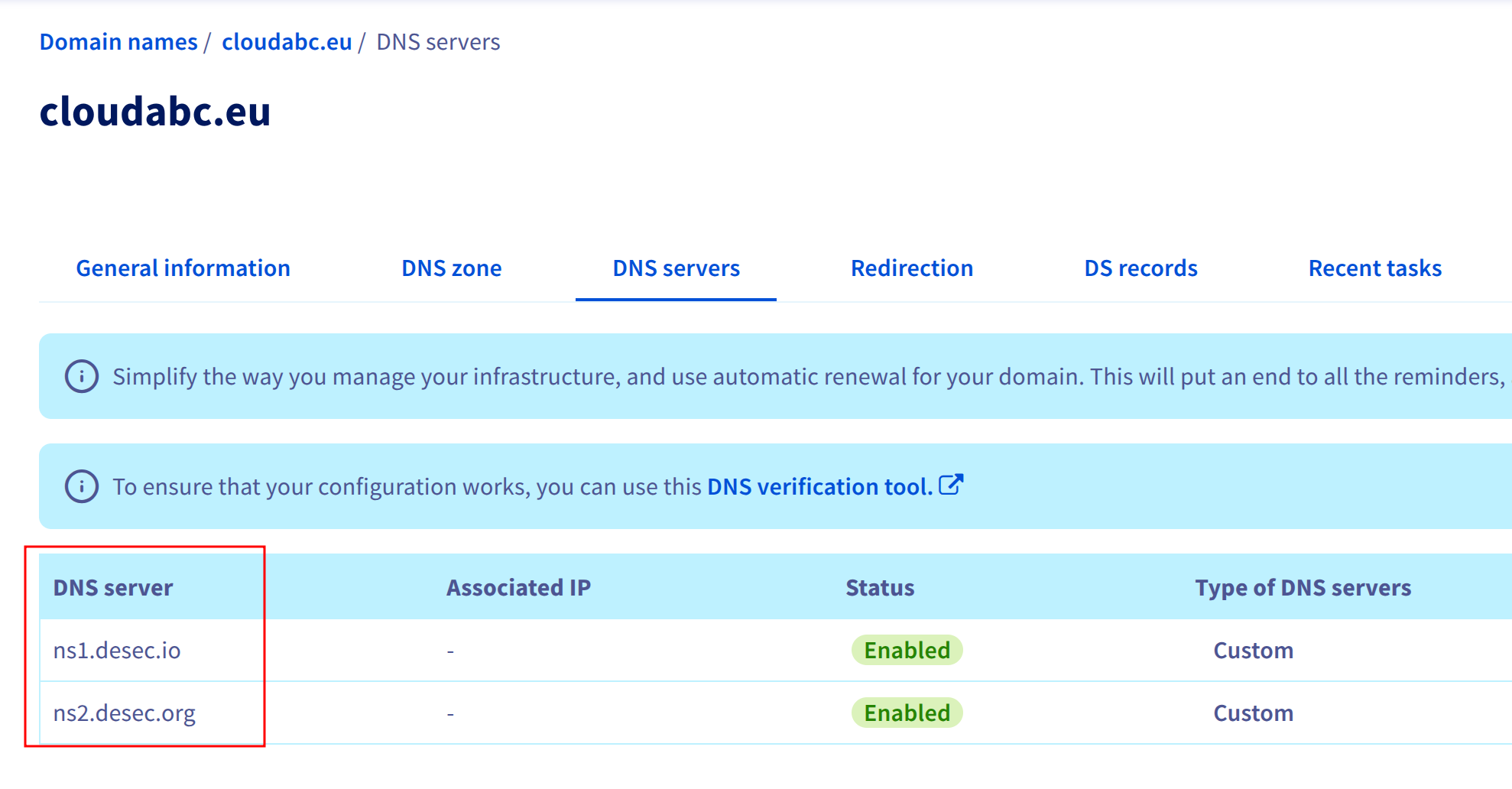
- Update Nameservers → Point your domain to deSEC’s nameservers at your registrar
- Create Token → get your API token
Click “Token Management”,
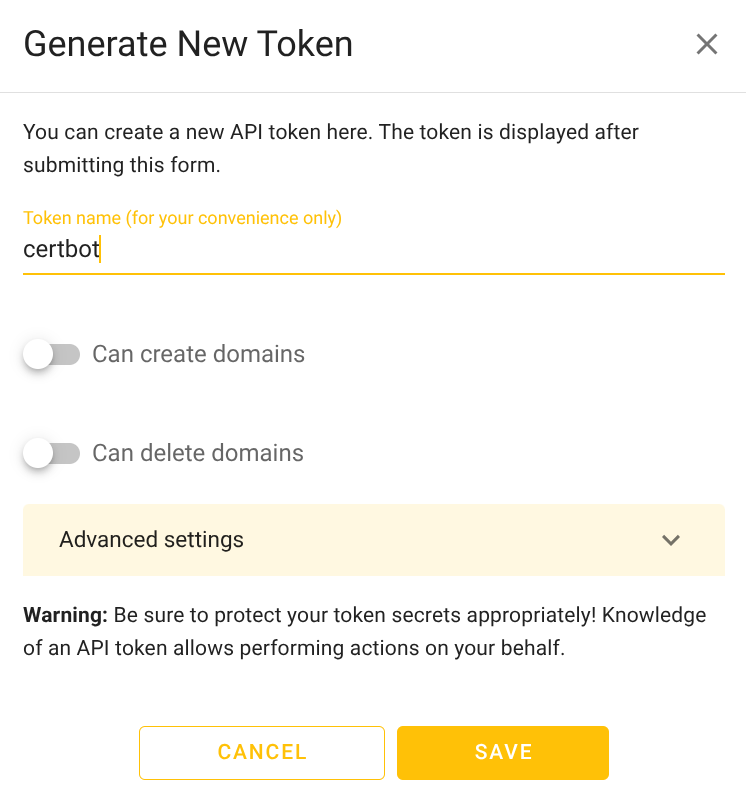
Then click “Save”
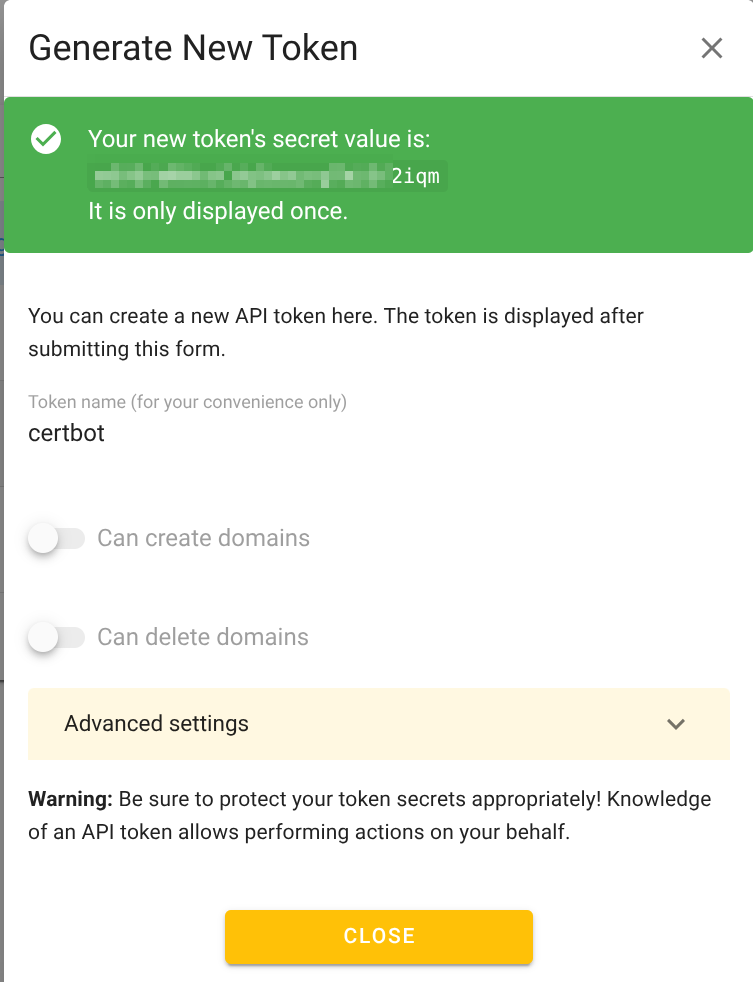
Note: PLEASE Save the token safely !
Verification
DNS Server
DOMAIN=<Your domain>
TOKEN=<Your deSEC.io token>
EMAIL=<Your email>

# dig NS $DOMAIN +short
ns1.desec.io.
ns2.desec.org.
Token
# curl -s -H "Authorization: Token $TOKEN" https://desec.io/api/v1/domains/ | jq .
[
  {
    "created": "2025-12-01T08:37:14.341257Z",
    "published": "2025-12-06T15:52:22.676459Z",
    "name": "cloudabc.eu",
    "minimum_ttl": 3600,
    "touched": "2025-12-06T15:52:22.676459Z"
  }
]
TXT record for _acme-challenge
Add a TXT record as below
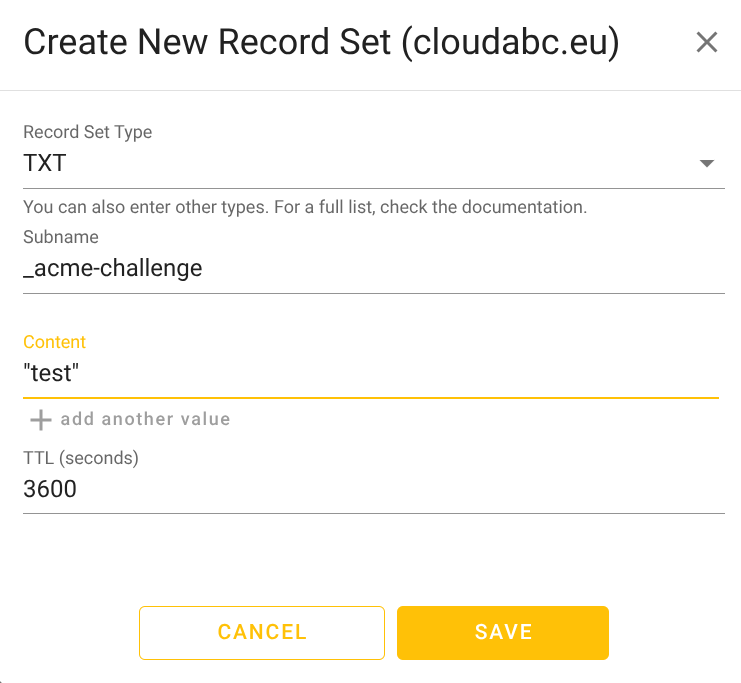
After a while
# dig _acme-challenge.$DOMAIN TXT +short
"test"

# nslookup -type=TXT _acme-challenge.$DOMAIN
Non-authoritative answer:
_acme-challenge.cloudabc.eu	text = "test"
Genenrate LetsEncrypt Certificate with certbot
Certbot is the official, recommended client from Let’s Encrypt (developed by the Electronic Frontier Foundation). It’s a Python-based tool that provides a user-friendly interface for certificate management.
Key Features:
- Official Let’s Encrypt client
- Plugin system for various web servers and DNS providers
- Auto-renewal via systemd/cron
- Web server integration (Apache, Nginx, etc.)
- Extensive documentation and community support
Install certbot and deSEC plugin
apt install python3-certbot
python3 -m pip install git+https://github.com/desec-io/certbot-dns-desec.git --break-system-packages
certbot plugins
# certbot plugins
Saving debug log to /var/log/letsencrypt/letsencrypt.log

- - - - - - - - - - - - - - - - - - - - - - - - - - - - - - - - - - - - - - - -
* dns-desec
Description: Obtain certificates using a DNS TXT record (if you are using
deSEC.io for DNS).
Interfaces: Authenticator, Plugin
Entry point: EntryPoint(name='dns-desec',
value='certbot_dns_desec.dns_desec:Authenticator', group='certbot.plugins')
Generate certificates with certbot
sudo mkdir -p /etc/letsencrypt/secrets/
sudo chmod 700 /etc/letsencrypt/secrets/
echo "dns_desec_token = $TOKEN" | sudo tee /etc/letsencrypt/secrets/$DOMAIN.ini
sudo chmod 600 /etc/letsencrypt/secrets/$DOMAIN.ini

# sudo certbot certonly \
    --non-interactive \
    --agree-tos \
    --email $EMAIL \
    --authenticator dns-desec \
    --dns-desec-credentials /etc/letsencrypt/secrets/$DOMAIN.ini \
    -d "$DOMAIN" \
    -d "*.$DOMAIN"

Saving debug log to /var/log/letsencrypt/letsencrypt.log
Requesting a certificate for cloudabc.eu and *.cloudabc.eu
Waiting 80 seconds for DNS changes to propagate

Successfully received certificate.
Certificate is saved at: /etc/letsencrypt/live/cloudabc.eu/fullchain.pem
Key is saved at:         /etc/letsencrypt/live/cloudabc.eu/privkey.pem
This certificate expires on 2026-03-06.
These files will be updated when the certificate renews.
Certbot has set up a scheduled task to automatically renew this certificate in the background.

- - - - - - - - - - - - - - - - - - - - - - - - - - - - - - - - - - - - - - - -
If you like Certbot, please consider supporting our work by:
 * Donating to ISRG / Let's Encrypt:   https://letsencrypt.org/donate
 * Donating to EFF:                    https://eff.org/donate-le
- - - - - - - - - - - - - - - - - - - - - - - - - - - - - - - - - - - - - - - -
Genenrate LetsEncrypt Certificate with acme.sh
acme.sh is a pure shell (bash) script implementing the ACME protocol. It’s lightweight, dependency-free, and designed for automation and embedded systems.
Key Features:
- Zero dependencies (just shell)
- Standalone mode doesn’t require web server
- Multiple DNS API support (100+ providers)
- Cross-platform (Linux, BSD, macOS, even Windows with WSL)
- Automatic installation and renewal
Install acme.sh
curl https://get.acme.sh | sh
Genenrate certificate with acme.sh
# DESEC_TOKEN=$TOKEN EMAIL=$EMAIL ~/.acme.sh/acme.sh --issue --dns dns_desec -d *.cloudabc.eu

[Sat Dec  6 20:49:05 UTC 2025] Using CA: https://acme.zerossl.com/v2/DV90
[Sat Dec  6 20:49:05 UTC 2025] Single domain='*.cloudabc.eu'
[Sat Dec  6 20:49:08 UTC 2025] Getting webroot for domain='*.cloudabc.eu'
[Sat Dec  6 20:49:08 UTC 2025] Adding TXT value: xxxxxxxxxxxxxxxxxxxxxxxxxx for domain: _acme-challenge.cloudabc.eu
[Sat Dec  6 20:49:08 UTC 2025] Using desec.io api
[Sat Dec  6 20:49:09 UTC 2025] Adding record
[Sat Dec  6 20:49:09 UTC 2025] Added, OK
[Sat Dec  6 20:49:09 UTC 2025] The TXT record has been successfully added.
[Sat Dec  6 20:49:09 UTC 2025] The TXT record has been successfully added.
[Sat Dec  6 20:49:09 UTC 2025] Let's check each DNS record now. Sleeping for 20 seconds first.
[Sat Dec  6 20:49:30 UTC 2025] You can use '--dnssleep' to disable public dns checks.
[Sat Dec  6 20:49:30 UTC 2025] See: https://github.com/acmesh-official/acme.sh/wiki/dnscheck
[Sat Dec  6 20:49:30 UTC 2025] Checking cloudabc.eu for _acme-challenge.cloudabc.eu
[Sat Dec  6 20:49:31 UTC 2025] Not valid yet, let's wait for 10 seconds then check the next one.
[Sat Dec  6 20:49:42 UTC 2025] Let's wait for 10 seconds and check again.
[Sat Dec  6 20:49:53 UTC 2025] You can use '--dnssleep' to disable public dns checks.
[Sat Dec  6 20:49:53 UTC 2025] See: https://github.com/acmesh-official/acme.sh/wiki/dnscheck
[Sat Dec  6 20:49:53 UTC 2025] Checking cloudabc.eu for _acme-challenge.cloudabc.eu
[Sat Dec  6 20:49:53 UTC 2025] Not valid yet, let's wait for 10 seconds then check the next one.
[Sat Dec  6 20:50:05 UTC 2025] Let's wait for 10 seconds and check again.
[Sat Dec  6 20:50:16 UTC 2025] You can use '--dnssleep' to disable public dns checks.
[Sat Dec  6 20:50:16 UTC 2025] See: https://github.com/acmesh-official/acme.sh/wiki/dnscheck
[Sat Dec  6 20:50:16 UTC 2025] Checking cloudabc.eu for _acme-challenge.cloudabc.eu
[Sat Dec  6 20:50:16 UTC 2025] Not valid yet, let's wait for 10 seconds then check the next one.
[Sat Dec  6 20:50:27 UTC 2025] Let's wait for 10 seconds and check again.
[Sat Dec  6 20:50:38 UTC 2025] You can use '--dnssleep' to disable public dns checks.
[Sat Dec  6 20:50:38 UTC 2025] See: https://github.com/acmesh-official/acme.sh/wiki/dnscheck
[Sat Dec  6 20:50:38 UTC 2025] Checking cloudabc.eu for _acme-challenge.cloudabc.eu
[Sat Dec  6 20:50:38 UTC 2025] Not valid yet, let's wait for 10 seconds then check the next one.
[Sat Dec  6 20:50:50 UTC 2025] Let's wait for 10 seconds and check again.
[Sat Dec  6 20:51:01 UTC 2025] You can use '--dnssleep' to disable public dns checks.
[Sat Dec  6 20:51:01 UTC 2025] See: https://github.com/acmesh-official/acme.sh/wiki/dnscheck
[Sat Dec  6 20:51:01 UTC 2025] Checking cloudabc.eu for _acme-challenge.cloudabc.eu
[Sat Dec  6 20:51:01 UTC 2025] Not valid yet, let's wait for 10 seconds then check the next one.
[Sat Dec  6 20:51:12 UTC 2025] Let's wait for 10 seconds and check again.
[Sat Dec  6 20:51:23 UTC 2025] You can use '--dnssleep' to disable public dns checks.
[Sat Dec  6 20:51:23 UTC 2025] See: https://github.com/acmesh-official/acme.sh/wiki/dnscheck
[Sat Dec  6 20:51:23 UTC 2025] Checking cloudabc.eu for _acme-challenge.cloudabc.eu
[Sat Dec  6 20:51:23 UTC 2025] Success for domain cloudabc.eu '_acme-challenge.cloudabc.eu'.
[Sat Dec  6 20:51:23 UTC 2025] All checks succeeded
[Sat Dec  6 20:51:23 UTC 2025] Verifying: *.cloudabc.eu
[Sat Dec  6 20:51:25 UTC 2025] Processing. The CA is processing your order, please wait. (1/30)
[Sat Dec  6 20:51:29 UTC 2025] Success
[Sat Dec  6 20:51:29 UTC 2025] Removing DNS records.
[Sat Dec  6 20:51:29 UTC 2025] Removing txt: xxxxxxxxxxxxxxxxxxxxxxxxxx for domain: _acme-challenge.cloudabc.eu
[Sat Dec  6 20:51:29 UTC 2025] Using desec.io api
[Sat Dec  6 20:51:30 UTC 2025] Deleting record
[Sat Dec  6 20:51:30 UTC 2025] Deleted, OK
[Sat Dec  6 20:51:30 UTC 2025] Successfully removed
[Sat Dec  6 20:51:30 UTC 2025] Verification finished, beginning signing.
[Sat Dec  6 20:51:30 UTC 2025] Let's finalize the order.
[Sat Dec  6 20:51:30 UTC 2025] Le_OrderFinalize='https://acme.zerossl.com/v2/DV90/order/xxxxxxxxxxxxxxxx/finalize'
[Sat Dec  6 20:51:32 UTC 2025] Order status is 'processing', let's sleep and retry.
[Sat Dec  6 20:51:32 UTC 2025] Sleeping for 15 seconds then retrying
[Sat Dec  6 20:51:48 UTC 2025] Polling order status: https://acme.zerossl.com/v2/DV90/order/xxxxxxxxxxxxxxxx
[Sat Dec  6 20:51:49 UTC 2025] Downloading cert.
[Sat Dec  6 20:51:49 UTC 2025] Le_LinkCert='https://acme.zerossl.com/v2/DV90/cert/xxxxxxxx'
[Sat Dec  6 20:51:50 UTC 2025] Cert success.
-----BEGIN CERTIFICATE-----
....
-----END CERTIFICATE-----
[Sat Dec  6 20:51:50 UTC 2025] Your cert is in: /root/.acme.sh/*.cloudabc.eu_ecc/*.cloudabc.eu.cer
[Sat Dec  6 20:51:50 UTC 2025] Your cert key is in: /root/.acme.sh/*.cloudabc.eu_ecc/*.cloudabc.eu.key
[Sat Dec  6 20:51:50 UTC 2025] The intermediate CA cert is in: /root/.acme.sh/*.cloudabc.eu_ecc/ca.cer
[Sat Dec  6 20:51:50 UTC 2025] And the full-chain cert is in: /root/.acme.sh/*.cloudabc.eu_ecc/fullchain.cer
The certificate and key can be found at
# ls -l /root/.acme.sh/*.cloudabc.eu_ecc/
total 28
-rw-r--r-- 1 root root 1428 Dec  6 20:51 '*.cloudabc.eu.cer'
-rw-r--r-- 1 root root  560 Dec  6 20:51 '*.cloudabc.eu.conf'
-rw-r--r-- 1 root root  465 Dec  6 20:49 '*.cloudabc.eu.csr'
-rw-r--r-- 1 root root  186 Dec  6 20:49 '*.cloudabc.eu.csr.conf'
-rw------- 1 root root  227 Dec  6 12:45 '*.cloudabc.eu.key'
-rw-r--r-- 1 root root 2668 Dec  6 20:51  ca.cer
-rw-r--r-- 1 root root 4096 Dec  6 20:51  fullchain.cer